Canny Ideas Explained: Do You Actually Need This Complexity?
Shayan, Founder9 min read

Canny just launched their biggest update ever: Canny Ideas. It turns their simple feedback tool into a hierarchical project management system with five levels of organization.
If you're a Canny user, you've probably gotten emails about this. If you're evaluating Canny, you need to know what you're signing up for.
Here's what's changed: Canny now needs 30-minute training webinars and regular "Office Hours" sessions just to explain how their product works. When your feedback tool needs training to use, something went wrong.
This post explains what Canny Ideas actually is, who it's built for, and whether you need it.
What Is Canny Ideas?
Canny replaced their flat feedback structure with five levels:
Groups > Subgroups > Ideas > Sub-ideas > Insights
Each level means something specific:
Groups are high-level initiatives or product areas (like "Mobile App" or "API").
Subgroups are features within those areas (like "Authentication" under "Mobile App").
Ideas are the core work items. Think tasks or feature requests.
Sub-ideas are smaller pieces that support a larger idea.
Insights are individual pieces of evidence. Customer quotes, internal feedback, anything that supports why you should build something.
Every idea now has two views. The internal view is what your team sees. It includes all sub-ideas, insights, and private notes. The external view is what customers see on your public portal.
Canny uses AI to auto-sort feedback into groups based on keywords you set up.
The Training Problem
When a product needs regular training sessions, it got too complex.
Canny now runs 30-minute webinars explaining the hierarchy. They hold "Office Hours" where teams ask setup questions. They have multiple video tutorials walking through when to use Groups vs Subgroups vs Ideas.
The topics they need to explain:
- How to organize feedback into groups and subgroups
- When something should be an idea vs a sub-idea
- What insights are and when to create them
- How the dual-view system works
- How auto-sorting categorizes feedback
- How to create different views for different teams
Your feedback tool shouldn't need this much explanation.
Who Actually Needs This?
Be honest about whether you need five levels of hierarchy.
Teams that might benefit:
- Enterprise product orgs with 50+ product managers
- Multi-product companies managing dozens of complex features
- Teams that already use Jira and want similar structure
- Organizations where everything needs sub-tasks and tracking
Teams that don't need this:
- Startups collecting feature requests from early users
- Small SaaS teams (under 20 people) building one product
- Anyone who values simplicity
- Teams that don't want to attend training sessions
Canny built Ideas for enterprise customers who can afford $99-$1,349/month and have resources to learn complex systems. If that's not you, you're paying for complexity you don't need.
The Cost
Canny Ideas isn't available on every plan.
| Plan | Ideas Access | Cost |
|---|---|---|
| Free | No | $0/month |
| Core | No | $24-656/month |
| Pro | Yes (beta) | $99-1,349/month |
| Business | Yes (full) | Custom pricing |
You need Pro plan minimum to access Ideas. That's $99/month for 100 tracked users. As your user count grows, your bill grows with it.
Legacy plan users are locked out completely unless they migrate. Canny removed the Growth plan from their website entirely. If you're on an old plan, your options are: stay limited or jump to Pro at $99+/month. There's no middle option anymore.
See our Canny pricing breakdown for detailed costs at different user counts.
What You Actually Get
What can you do with Ideas that you couldn't before?
New capabilities:
- Organize feedback across multiple hierarchy levels
- Track work privately without showing customers
- Break large features into sub-tasks
- Link multiple pieces of feedback to one idea
- Use built-in scoring (RICE, Kano, Jobs-to-be-Done)
- Create different roadmap views for sales, engineering, and leadership
What didn't change:
- Feedback collection works the same
- Users still vote and comment normally
- Roadmaps and changelogs still exist
- Integrations still work
The core feedback functionality is identical. Ideas is an organizational layer on top. It's useful for large teams. It's overkill for most.
The Dual-View System
Every piece of feedback now lives in two places.
The internal view is admin-only. You see all sub-ideas, insights, private notes, scoring, and workflow. You organize everything into groups and subgroups.
The external view is public. Customers see status, comments, and votes. The internal hierarchy isn't visible. It links back to the internal idea.
This means constantly switching between views. Want the full picture? Internal view. Want to see what customers see? Switch to external.
The problem: this adds cognitive load. You need to remember which view you're in and what's visible where.
There's a bigger risk too. The dual-view system makes it easy to do all your planning in the internal view and forget to update the external one. Your customers stop seeing what you're working on. You stop building in public. Feedback becomes a black box where things go in but nothing comes out.
A Simpler Approach
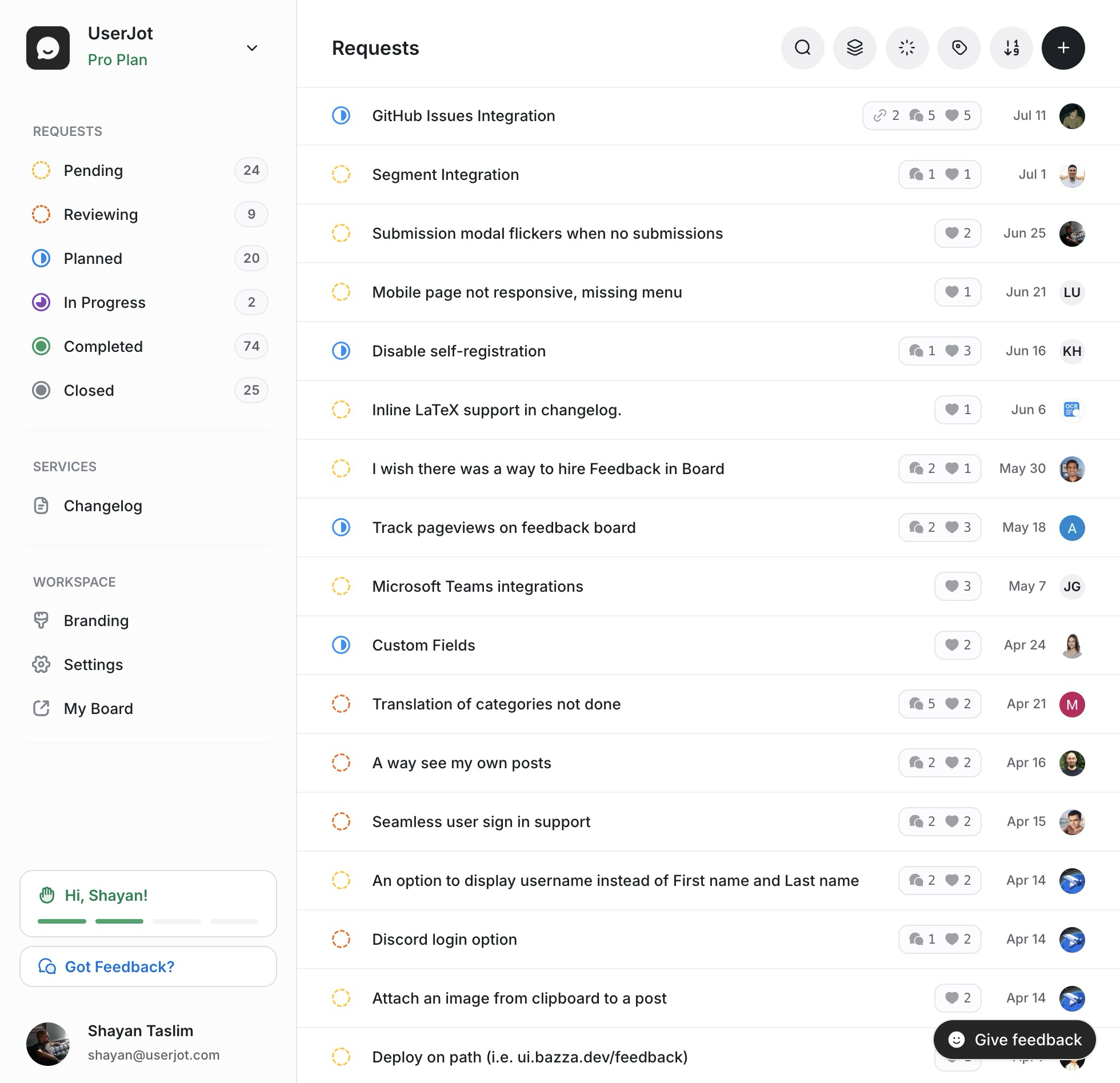
We built UserJot for teams that want to collect feedback and ship features, not organize hierarchies.
Canny is optimizing for enterprise product orgs with dedicated PMs who manage complex workflows. We're optimizing for small teams that need to move fast. If you spend more time organizing feedback than acting on it, the tool is too complex.
Our structure is simple:
Boards organize feedback by product area or theme.
Posts are the actual feedback from users.
Statuses track progress: Pending, Review, Planned, In Progress, Completed.
That's it. No five-level hierarchy. No dual-view system. No training required.
What you get with UserJot:
| Feature | Canny (with Ideas) | UserJot |
|---|---|---|
| Structure | 5-level hierarchy | Boards > Posts > Statuses |
| Training | 30-min webinars | None |
| User limits | 25-5,000+ tiered | Unlimited on all plans |
| Pricing | $24-$1,349/mo | $29-59/mo flat |
| Setup time | Hours | 30 seconds |
When UserJot works better:
You have 100-10,000 users and don't want to pay per person. You value simplicity over enterprise features. You want predictable costs. You're a growing startup, not Fortune 500.
See our Canny alternative comparison for detailed features.
Should You Use Ideas?
Ask yourself these questions.
Use Ideas if:
- You manage multiple product lines that need separate hierarchies
- You have 20+ product managers who need different organizational views
- You're managing enterprise feedback with complex workflows
- You have budget for $99-$1,349/month
- You're okay attending training to learn the system
Skip Ideas if:
- You're a startup or small team (under 20 people)
- You just need voting boards and a roadmap
- You want to avoid per-user pricing
- You don't want to explain dual-views to your team
- You value simplicity
What This Means for Canny
Ideas signals where Canny is heading. They're moving upmarket.
They're building for large organizations with complex needs and big budgets. That's why they added five-level hierarchies, gated Ideas behind Pro plan, run training webinars, and increased prices significantly.
Their tracked user pricing now scales to $1,349/month. They focus on audience-specific views for large org structures. They assume dedicated teams who can attend training.
If you're a small team or startup, you're no longer their target customer. They're optimizing for enterprise deal sizes, not simplicity or affordability.
This creates room for alternatives that focus on what most teams need: simple feedback management without enterprise bloat.
See our top Canny alternatives for other options.
Feedback doesn't need five levels of hierarchy. Unlimited users, simple structure, $29/mo.
UserJot keeps feedback, roadmap, and changelog in one simple loop.
Before You Commit to Ideas
If you're on Canny and feeling pressure to upgrade, consider this.
Questions to ask:
Do we actually need five levels of hierarchy? Most teams don't. If boards and statuses work today, they'll work tomorrow.
Will our team use dual-views correctly? Switching between internal and external views adds friction. Will your team remember which view they're in?
Can we justify $99-$1,349/month? That's $1,188-$16,188 per year for feedback software. Could you use something simpler and invest savings elsewhere?
Do we want to attend training? If your feedback tool needs training, it's too complex.
Switching to UserJot:
Migration takes about 2 minutes. Grab your Canny API key, paste it into UserJot, and we import your posts, comments, votes, and changelog entries automatically. Our AI maps your boards and statuses. You review the mappings, click Start Import, and UserJot keeps each post, comment, and vote connected to the participating user. Canny users with no imported activity are not copied. No downtime.
Most teams save 70-90% on costs. See our Canny migration guide for step-by-step instructions.
Frequently Asked Questions
What exactly is Canny Ideas?
Canny Ideas is a hierarchical feedback management system with five levels: Groups, Subgroups, Ideas, Sub-ideas, and Insights. It adds a dual-view system where feedback has an internal view (team-only) and external view (customer-facing). It's designed for enterprise teams managing complex product feedback.
Do I need to upgrade to use Canny Ideas?
Yes. Ideas is only available on Pro plan ($99/month minimum) and Business plan (custom pricing). Free and Core plan users can't access Ideas. Legacy plan users must migrate to new pricing to get access.
How much does Canny cost with Ideas access?
Pro plan with Ideas starts at $99/month for 100 tracked users. At 1,000 users, you pay $661/month. Business plan typically costs $1,000-$1,500/month. See our Canny pricing breakdown for detailed costs.
Why does Canny need training webinars for Ideas?
Ideas adds significant complexity: five-level hierarchies, dual-view systems, auto-sorting algorithms, and audience-specific views. Canny runs 30-minute training webinars and "Office Hours" because teams can't figure it out on their own.
Can I use Canny without Ideas?
Yes. If you're on Free or Core plan, you use the old system without Ideas. But Canny is positioning Ideas as their future, so expect fewer updates to the non-Ideas experience.
What's the difference between Groups and Subgroups in Canny?
Groups are high-level product areas or initiatives (like "Mobile App" or "Integrations"). Subgroups are subdivisions within groups (like "iOS Features" under "Mobile App"). Think folders and subfolders.
What are Insights in Canny Ideas?
Insights are evidence that supports why an idea should be prioritized. Customer quotes, internal feedback, revenue impact notes, or competitive analysis. They're only visible in the internal view.
Is there a simpler alternative to Canny Ideas?
Yes. UserJot uses Boards, Posts, and Statuses. No five-level hierarchy, no dual-views, no training. You get unlimited users on all plans ($29-59/month flat) while Canny charges per tracked user. See our Canny alternative page.
Who should actually use Canny Ideas?
Canny Ideas makes sense for enterprise product teams with 50+ product managers, multiple product lines, and budgets over $1,000/month. If you're a startup, small SaaS team, or value simplicity, you probably don't need this complexity.
Can I migrate from Canny to UserJot easily?
Yes. Migration takes about 2 minutes. Get your Canny API key, paste it into UserJot's import tool, and we handle the rest. Our AI maps your boards and statuses for you to review. Posts, votes, comments, changelog entries, and their participating users transfer with no downtime. Canny users with no imported activity are not copied. Most teams save 70-90% on monthly costs. See our step-by-step migration guide.
Will Canny force everyone to use Ideas eventually?
Probably. Canny is positioning Ideas as their platform's future and gating it behind expensive plans. Legacy users are already frozen out, creating pressure to upgrade. This is a common pattern: add complexity, justify higher prices, phase out simpler options.
How does UserJot handle feedback organization without hierarchies?
UserJot uses Boards (product areas), Posts (feedback items), and Statuses (workflow stages). You can create multiple boards, use tags for categorization, and filter/search everything. It's flat, fast, and doesn't need training. For 95% of teams, this is enough.
The Bottom Line
Canny Ideas is impressive engineering. It's built for enterprise teams with complex needs.
But do you actually need it?
If you're managing feedback for Microsoft or Salesforce, maybe. If you're a startup trying to listen to users and build the right features, probably not.
The best feedback tool is one your team actually uses. If you need webinars to understand your feedback software, you chose the wrong tool.
UserJot keeps it simple: collect feedback, organize it, show progress. No hierarchies, no dual-views, no training. Just clean feedback management that works.
Try it free. No credit card required. Unlimited users from day one.
Stop guessing what to build. Let your users vote.
UserJot keeps feedback, roadmap, and changelog in one simple loop.