How to Get Customer Feedback: 12 Methods That Actually Work
Shayan, FounderUpdated 11 min read

Most SaaS teams know they should collect customer feedback. Few actually do it well.
The problem isn't a lack of methods. It's that most feedback efforts die somewhere between "we should really talk to customers more" and actually building something customers asked for. You send a survey, get a handful of responses, and then... nothing happens. The feedback sits in a spreadsheet. Customers never hear back. And six months later, you're still guessing what to build next.
I've seen this pattern at every company I've worked with. The solution isn't more surveys. It's building a customer feedback system where feedback flows into decisions and customers see the results. That's what this guide is about.
Why Feedback Matters More Than You Think
Let's start with some numbers that might surprise you.
77% of consumers view brands more favorably when they actively seek out and apply customer feedback. That's not just a feel-good stat. It means customers actually prefer companies that listen, and they're more likely to stick around.
Companies that regularly collect and act on feedback see about 15% higher customer retention. When you consider that a 5% increase in retention can boost profits by 25-95% (depending on your industry), that feedback loop starts looking less like a nice-to-have and more like a growth strategy.
But here's what most articles miss: feedback isn't just about fixing problems. It's about finding opportunities. When a customer says "I wish this did X," that's market research delivered directly to your inbox. You're learning what to build without paying for focus groups or guessing based on competitor features.
The companies that win long-term are the ones that make feedback a core part of how they operate, not an occasional survey they send out when someone remembers.
The 12 Methods That Actually Work
There's no single best way to collect feedback. Different methods work for different situations. Here's what I've seen work, along with when to use each.
1. In-App Feedback Widgets
Response rates for in-app surveys typically hit 20-40%, compared to 15-25% for email surveys. The reason is simple: you're catching people in context, right when they're using your product.
The best widgets are unobtrusive. A small feedback button in the corner. A prompt after someone completes a key action. Nothing that interrupts the workflow.
Tools like UserJot let you embed a feedback widget directly in your app. Users can submit ideas, report bugs, and see your roadmap without leaving. The key is making it feel like part of the product, not an interruption.
When to use it: Always. This should be your default, always-on feedback channel.
2. Public Feedback Boards
This is where feedback gets interesting. Instead of collecting feedback privately and deciding what matters behind closed doors, you let customers see each other's suggestions and vote on them.
Public boards do a few things at once:
- Customers can search before submitting (reducing duplicates)
- Popular requests bubble up naturally through votes
- You get social proof about what people actually want
- Customers feel heard because they can see their feedback exists
The transparency matters. When someone submits feedback and sees it appear on a public board, they know it didn't disappear into a void. And when they see votes accumulating, they know other people agree.
When to use it: For feature requests and product ideas. Less useful for bug reports or sensitive feedback.
3. NPS, CSAT, and CES Surveys
These three survey types each measure something different:
NPS (Net Promoter Score): "How likely are you to recommend us?" Gives you a high-level health check on customer sentiment. Useful for tracking trends over time.
CSAT (Customer Satisfaction): "How satisfied were you with X?" Best for measuring specific interactions, like support calls or feature experiences.
CES (Customer Effort Score): "How easy was it to do X?" Identifies friction points in your product. If something is hard to use, this will surface it.
The mistake most teams make is treating these as vanity metrics. A score by itself is useless. The value comes from the follow-up questions: "Why did you give that score?" and "What would change your mind?"
When to use it: NPS quarterly for overall health. CSAT after specific interactions. CES after users complete key workflows.
4. User Interviews
Nothing replaces actually talking to customers. Surveys tell you what people do. Interviews tell you why.
The trick is keeping interviews focused. You're not looking for general feedback about everything. Pick a specific topic: Why did you sign up? What almost made you cancel? How do you use feature X?
Some practical tips:
- Keep it to 20-30 minutes. Anything longer and quality drops.
- Ask open-ended questions. "Tell me about..." works better than "Do you like..."
- Record the calls (with permission) so you can focus on listening.
- Talk to churned customers. They'll tell you things current customers won't.
When to use it: When you need to understand the "why" behind behaviors. Before building major features. After seeing unexpected patterns in quantitative data.
5. Support Ticket Analysis
Your support team is sitting on a goldmine of feedback. Every ticket is a customer telling you something isn't working for them.
The challenge is turning individual tickets into patterns. Tag tickets by topic. Track which issues come up repeatedly. Look for requests disguised as questions ("Is there a way to...?" usually means "I wish I could...").
If the same question keeps coming up, that's feedback about your documentation, onboarding, or product design. If people keep requesting the same feature through support, that's product feedback.
When to use it: Continuously. Set up a system where support insights get shared with product regularly.
6. Exit Surveys
When someone cancels, that's your most valuable feedback opportunity. They've made a decision, and they know exactly why.
Keep exit surveys short. One or two questions max:
- Why are you leaving?
- What would have changed your mind?
Some teams make exit feedback mandatory. You can't cancel without telling them why. This sounds aggressive, but churn feedback is too valuable to leave optional. Just keep it quick so it doesn't add frustration.
When to use it: Always. Every cancellation should trigger a feedback request.
7. Onboarding Feedback
The first few days determine whether someone sticks around. Ask for feedback during and right after onboarding:
- What was confusing during setup?
- What did you expect that you didn't find?
- How could we make getting started easier?
You'll catch issues that seem obvious once someone points them out. The button that's hard to find. The step that doesn't make sense. The feature they expected but couldn't locate.
When to use it: At key onboarding milestones and 24-48 hours after signup.
8. Feature Voting
Let customers vote on what you should build next. This does two things: it gives you prioritization data, and it makes customers feel invested in your roadmap.
The vote count isn't everything. A feature with 50 votes from free users is different from a feature with 10 votes from enterprise customers. Weight votes by customer value when prioritizing.
UserJot includes voting on feedback boards, with votes tied to customer data. So you can see not just how many people want something, but who wants it and how much they're paying.
When to use it: For feature requests. Let voting inform prioritization, but don't let it dictate everything.
9. Social Listening
Customers talk about you in places you don't control. Twitter, Reddit, G2 reviews, industry Slack communities. That feedback is unfiltered and often more honest than direct surveys.
Set up alerts for your company name and product. Check relevant subreddits and communities. Read your reviews on G2, Capterra, and similar platforms.
The feedback here is unsolicited, which makes it valuable. Nobody is trying to be polite. You'll see what people really think.
When to use it: Continuously. Set up Google Alerts and check relevant communities weekly.
10. Post-Release Feedback
After you ship something, ask users what they think. This is different from general feedback because it's targeted at a specific change.
"We just released X. What do you think?"
This closes the loop. You built something, shipped it, and now you're checking if it actually solved the problem. If it didn't, you learn that fast instead of assuming success.
When to use it: After every significant release. Target users who requested the feature or who are likely to use it.
Stop guessing what to build. Let your users vote.
UserJot keeps feedback, roadmap, and changelog in one simple loop.
11. Beta Testing Groups
Before releasing to everyone, get feedback from a smaller group. Beta testers tend to be more engaged and more forgiving of rough edges.
Build a list of customers who've expressed interest in new features. Invite them to try things early. Make it feel exclusive, not like free QA work.
Beta feedback is faster and cheaper than fixing issues after launch. And beta testers often become your biggest advocates because they feel ownership over features they helped shape.
When to use it: Before major launches. For features that change workflows significantly.
12. Periodic Check-ins
Some feedback comes from just asking "How are things going?"
Quarterly business reviews with larger customers. Quick check-in emails to active users. A simple "anything we could do better?" from your founders.
These conversations surface issues that don't fit neatly into surveys or feature requests. Relationship issues. Concerns about your direction. Opportunities you're missing.
When to use it: Quarterly for key accounts. Periodically for active users. Especially after customers hit milestones (3 months, 6 months, 1 year).
When to Ask for Feedback
Timing matters as much as the method.
Good moments to ask:
- Right after someone completes a key action (made a purchase, finished onboarding, used a feature)
- 24-48 hours after an interaction (support call, demo, major update)
- After milestones (first month, first success, first renewal)
- When behavior changes (stopped logging in, started using a new feature heavily)
Bad moments to ask:
- During a task they're trying to complete
- Immediately when they land on your site
- Too frequently (survey fatigue is real)
- Right after something went wrong (let them cool down first)
The goal is catching people when they have something to say but aren't annoyed by the interruption. Post-action is usually the sweet spot.
How to Ask Without Annoying People
Most surveys fail because they're too long, poorly timed, or feel pointless.
Keep surveys under one minute. Four questions max. If you need more, do an interview instead.
Tell people what you'll do with the feedback. "Help us decide what to build next" beats "We value your input." People are more likely to respond when they believe it matters.
Use clear, specific questions:
- "What's one thing we could improve?" (better than "Any feedback?")
- "What almost made you cancel?" (better than "How satisfied are you?")
- "What feature do you wish we had?" (better than "Any feature requests?")
Avoid leading questions. "How great was your experience?" assumes it was great. "How was your experience?" lets them tell you.
And always, always follow up. If someone gives feedback and never hears back, they won't bother next time.
The Part Everyone Forgets: What Happens After
Collecting feedback is the easy part. The hard part is doing something with it.
Most feedback systems fail here. Feedback comes in, gets read once, and then sits in a tool nobody checks. Months later, someone asks "what do customers want?" and nobody knows because the feedback is scattered across surveys, emails, and support tickets.
You need a system that turns feedback into action. Here's what that looks like:
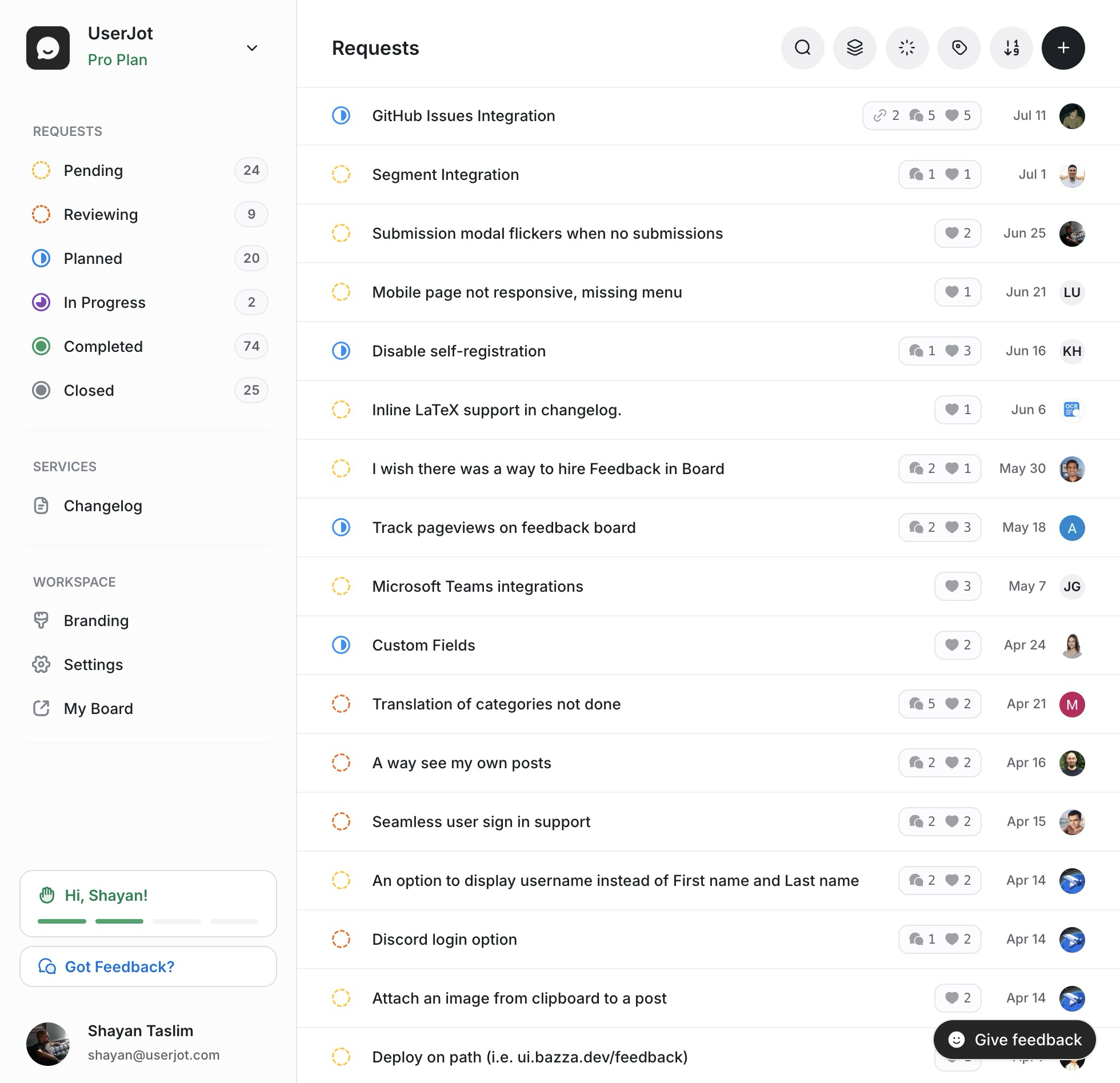
1. Centralize everything. All feedback should flow into one place. Feature requests from the widget, survey responses, support insights, sales call notes. If it lives in five different tools, it's effectively invisible.
2. Categorize and tag. Group feedback by theme, feature area, or customer segment. "Login issues" is more useful than 47 separate tickets about login.
3. Connect feedback to customers. Know who asked for what. A request from your biggest customer matters more than the same request from a free trial user.
4. Make it visible to the team. Product managers, engineers, and leadership should all see what customers are saying. If feedback lives only in one person's head, decisions get made without it.
5. Close the loop. When you build something someone requested, tell them. "Hey, you asked for X six months ago. We just shipped it." This one thing will dramatically increase future feedback because people see it matters.
This is actually why I built UserJot. I was tired of feedback disappearing into spreadsheets and Notion docs that nobody checked. UserJot puts feedback, voting, roadmaps, and changelogs in one place. When you ship something, customers who requested it get notified automatically. The loop closes without you having to remember who asked for what.
Common Mistakes to Avoid
Asking for feedback you won't use. If you're not going to act on survey responses, don't send the survey. You're wasting customer goodwill.
Survey fatigue. If you're asking for feedback weekly, people will stop responding. Consolidate requests and ask less frequently.
Ignoring negative feedback. It's tempting to dismiss critics as outliers. Sometimes they're seeing problems everyone else has but hasn't mentioned.
Building everything customers ask for. Customer feedback should inform decisions, not dictate them. Sometimes customers ask for things that wouldn't actually help them. Your job is to understand the underlying problem, not just fulfill feature requests.
No follow-up. If someone takes time to give feedback and hears nothing back, they'll feel ignored. Even a simple "thanks, we're looking into this" matters.
Asking the wrong people. Feedback from churned customers tells you different things than feedback from power users. Know who you're asking and why.
Making Feedback Part of Your Culture
The companies that do feedback well don't treat it as a project. It's how they operate.
Product decisions start with "what are customers saying about this?" Roadmaps are informed by voting and request patterns. Releases include check-ins with users who requested the feature. Support insights get shared in product meetings.
This doesn't require a massive process overhaul. Start with one channel that works. Get feedback flowing. Act on it visibly so customers see results. Then expand.
The goal isn't to collect the most feedback. It's to build products customers actually want. Feedback is just the input that makes that possible.
Getting Started
If you're not collecting feedback systematically today, start simple:
-
Add a feedback widget to your product. Make it easy for users to share ideas and issues without leaving your app.
-
Set up an exit survey. Understand why people cancel.
-
Pick one method from this list and do it consistently. Weekly customer calls, monthly NPS surveys, whatever fits your team.
-
Create a visible place for feedback. Somewhere the whole team can see what customers are saying.
-
Close one loop. Find a piece of feedback, act on it, and tell the customer. See how it feels. Then do it again.
Feedback isn't complicated. But it does require consistency. The teams that win are the ones that show up, listen, and respond, week after week. The tools help, but the habit matters more.
If you want a system that handles the mechanics, UserJot can help. But whatever you use, the important thing is starting. Your customers have opinions. They're willing to share them. The question is whether you're set up to hear them and do something about it.